Zenvelope

For freelancers, consultants and small teams

The private email app for iPhone, iPad and Mac. Pay once. No subscription.

All your accounts in one fast, native app. Zenvelope keeps a full copy of your mail on your device, sorts it by clear rules instead of AI, and never routes your mail through servers of ours.

CZK 699one-timeno subscription

Coming soon to the App Store

See what it does

One purchase for iPhone, iPad and Mac.

Zenvelope on iPad: the sidebar with mailboxes, the Smart Inbox with Priority, People, Notifications and Newsletters sections, and a client’s message with two attachments open beside it.
A conversation on iPhone: the client’s reply below your earlier message.
The calendar agenda on iPhone: today’s studio stand-up, lunch and retrospective, and a hike on Saturday.

Works with any IMAP account, including

  • iCloud Mail
  • Gmail
  • Seznam.cz
  • Fastmail
  • your company server
In short

What is Zenvelope?

Zenvelope is a native email app for iPhone, iPad and Mac that connects straight to your own mail provider — iCloud Mail, Gmail, Seznam.cz, Fastmail or a company server — over IMAP and SMTP. There is no Zenvelope server in between and no account to create.

Zenvelope keeps a full copy of your mail on your device, so reading and searching work offline. It sorts the inbox by rules you can see — people first, then notifications and newsletters — instead of AI, and it blocks tracking pixels until you allow images.

Zenvelope costs CZK 699 incl. VAT as a one-time purchase that covers iPhone, iPad and Mac, with no subscription and no in-app purchases. It is made for freelancers, consultants and small teams who run their work from several mail accounts. It is coming soon to the App Store.

Key facts

Price
CZK 699 incl. VAT, one-time; no subscription, no in-app purchases
Devices
iPhone and iPad with iOS 17 or later, Mac with macOS 14 or later; one purchase for all
Accounts
Any IMAP and SMTP account: iCloud Mail, Gmail, Seznam.cz, Fastmail, company servers. Outlook.com and Microsoft 365: not yet
Privacy
No servers of ours, no account with us, no analytics, no ads; tracking pixels blocked
Offline
A full copy of every folder on your device
AI
None — the Smart Inbox sorts by rules you can see
Languages
English, Czech and German
Availability
Coming soon to the App Store
Made by
Jakub Jirák, an independent developer

Last updated:

Why switch

Four reasons to switch.

Plenty of mail apps want a monthly fee, an account and a look at your mail. Zenvelope needs none of them.

  • 1×

    Pay once

    CZK 699. No subscription and no in-app purchases.

  • 0

    Servers of ours

    Your mail goes straight between your device and your provider.

  • 0

    AI reading your mail

    Sorting follows clear rules, and you can see why.

  • 100%

    Offline

    A full copy of your mail on your device: read, search and write with no signal at all.

Zenvelope downloads a full copy of every folder while it is open (background refreshes on iPhone and iPad only catch up on new mail); the first download of a large mailbox takes a while. Messages over 50 MB keep their headers and text on the device, without the attachments.

Smart Inbox

An inbox that sorts itself — by rules, not guesses.

Mail from people comes first. Notifications and newsletters wait in their own sections, and the senders you choose stay on top as Priority. Every decision has a reason you can see: an unsubscribe link, an automated sender, someone you have written to.

  • Priority senders always on top
  • Gatekeeper: first-time senders wait in the Screener until you let them in
  • Junk, blocked senders and one-tap unsubscribe
Zenvelope on iPhone: the Smart Inbox with a “No reply yet” reminder and a Priority conversation at the top.
Calendar

Your calendar, right next to your mail.

See your week beside your inbox and answer invitations in one tap. Zenvelope shows when and where the meeting is, who is coming, and whether it clashes with anything you have planned.

  • Accept, Maybe or Decline straight from the message
  • Day, week, month and agenda views
  • Works with the calendars already on your device
The calendar on iPad: a week of events such as the morning stand-up, a client call, yoga and a Saturday hike, with one event’s details beside it.
A meeting invitation on iPhone with its card: the date, time and place, and Accept, Maybe and Decline buttons.
Time on your side

Write now. Send when it is right.

Schedule a message for later — it goes out at that time: on the Mac while Zenvelope is running, on iPhone and iPad also from a background refresh that iOS schedules at its discretion. Take a message back in the seconds after you send it, and get a nudge when nobody has replied. Archived the wrong thread? Undo puts it back.

  • Send later (sent by the app itself, also from iOS background refresh — there is no server to send for you), snooze and undo send
  • “Remind me if no reply” for mail you are waiting on
  • Undo for archive, move and delete — ⌘Z on a keyboard, shake on iPhone
  • Templates, and a signature for every account
Replying on iPad: the reply sheet with the recipient, subject and new text above the quoted message, over the inbox.
Privacy & offline

Private by design. Readable anywhere.

Zenvelope has no servers of its own, no account to create and no analytics. It keeps a full copy of your mail on your device, so you can read, search and write on a plane, in the mountains or with no signal at all.

  • No account with us, no servers run by us, no ads
  • Remote images and tracking pixels blocked until you allow them
  • A warning when a link leads somewhere other than it says
  • Optional settings sync through your own private iCloud, encrypted

Read the privacy policy

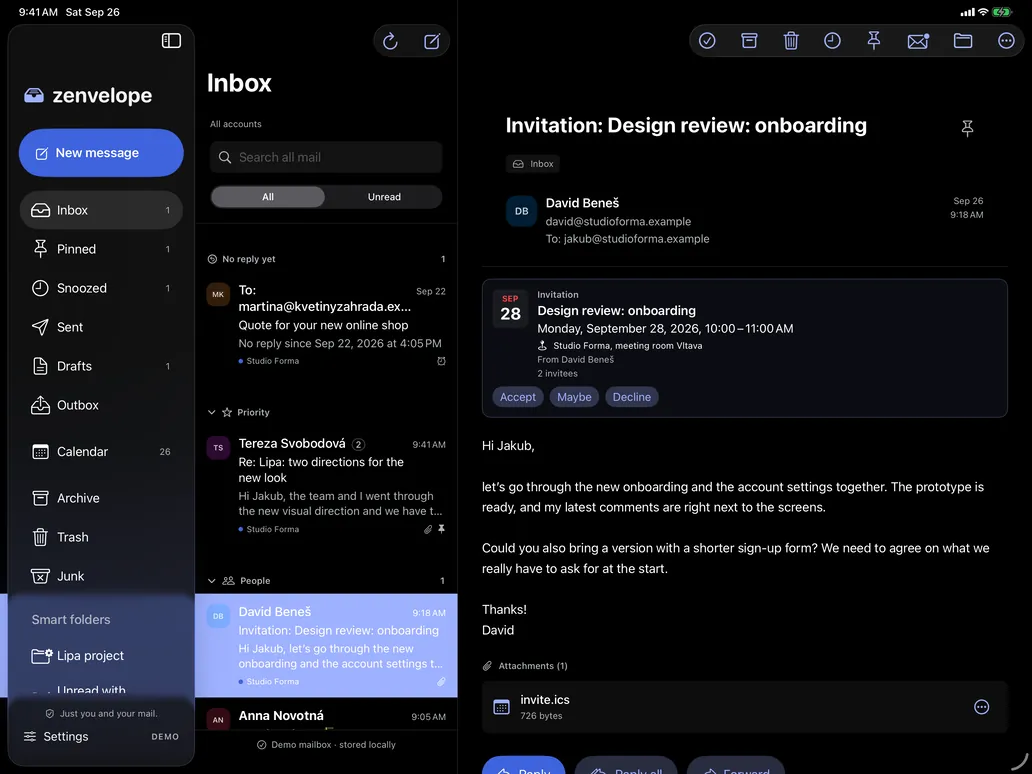
Zenvelope on iPad in dark mode: an invitation to a design review open beside the inbox, with the date, room and Accept, Maybe and Decline buttons.
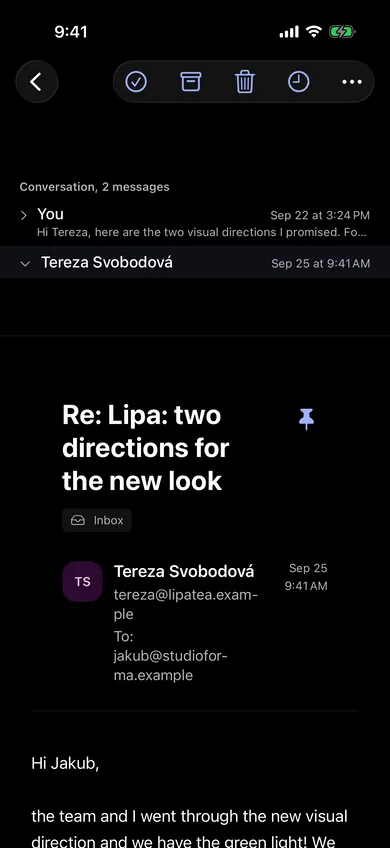
A conversation on iPhone in dark mode: the client’s reply below your earlier message.
Speed & search

Find anything in a moment — even offline.

A full copy of your mail lives on your device, so search never waits for a server. Narrow it down with a few words, save any search as a smart folder that stays up to date, and see new mail the moment it lands while Zenvelope is open.

  • Searches every folder of every account
  • Smart folders: any search, saved and always current
  • Instant new mail with IMAP IDLE, and notifications that come from the app itself, in the foreground and from iOS background refresh — there is no push server
Editing a smart folder on iPad: its name, the search it keeps, how many messages match and which accounts it covers.
And much more

Everything a mail app should do. Nothing it shouldn’t.

  • Any mail account

    iCloud, Gmail, Seznam.cz, Fastmail or your company server — any IMAP and SMTP account, always encrypted.

  • Gmail with an app-specific password

    Add Gmail over IMAP with an app-specific password from your Google Account. Google sign-in is not part of this version.

  • Spotlight and Handoff

    Your messages show up in the system’s Spotlight search, and Handoff continues a message on your other Apple device.

  • Quick Look and drag and drop

    Preview images and PDFs in place; drop files on a message to attach them.

  • Phishing warning

    Zenvelope tells you when a link’s real address doesn’t match its text.

  • Trackers blocked

    Remote images and tracking pixels stay off until you allow them, for one message or one sender.

  • Keyboard shortcuts

    Reply, archive, search and move around without leaving the keyboard.

  • Accessible

    VoiceOver, Dynamic Type up to the largest sizes and increased contrast.

  • English, Czech and German

    The whole app in three languages, following your system settings.

  • Settings in your iCloud

    Optionally keep accounts, signatures, smart folders and templates in your own private iCloud for your other devices.

Compare

Zenvelope vs. subscription mail apps

What changes when the app is the product — not a monthly fee, and not your mail.

ZenvelopeTypical subscription app
How you payCZK 699 onceA monthly or yearly fee
Where your mail travelsStraight to your providerOften through the vendor’s servers
AI processing your mailNoneIncreasingly built in
Account with the vendorNot neededOften required
Offline accessA full copy of your mailSometimes limited to recent mail
Ads and analyticsNoneVaries
New-mail notificationsFrom the app itself — no push server, so on iPhone and iPad they can arrive laterUsually instant, through the vendor’s push servers

The right column describes common practice in the category; individual apps differ.

Pricing

One price. Once.

CZK 699 one-time purchase, incl. VAT

The App Store shows the price in your local currency.

Coming soon to the App Store

  • Every feature on this page
  • iPhone, iPad and Mac with one purchase
  • No subscription, no in-app purchases
  • No ads, no tracking, no account with us
FAQ

Questions, answered.

Is there an email app for iPhone and Mac without a subscription?

Yes. Zenvelope costs CZK 699 incl. VAT as a one-time purchase (the App Store shows the local price in your country), and one purchase covers iPhone, iPad and Mac. No subscription, no in-app purchases, no ads.

Which email accounts work?

Any IMAP and SMTP account over SSL/TLS or STARTTLS: iCloud Mail, Gmail, Seznam.cz, Fastmail, company servers and more. Microsoft sign-in is coming; until then Outlook.com and Microsoft 365 can't be added.

Does it work with Gmail?

Yes, over IMAP with an app-specific password from your Google Account’s security settings (2-Step Verification has to be on). Sign in with Google is not available in this version.

Why does iCloud Mail ask for an app-specific password?

Apple only lets mail apps other than its own sign in to iCloud Mail with an app-specific password. You create one in a minute in your Apple Account’s Sign-In and Security settings.

Does Zenvelope use AI?

No. No AI reads, summarises or sorts your mail. The Smart Inbox follows clear rules — an unsubscribe link, an automated sender, someone you have written to — and shows you the reason for each decision.

What happens to my data?

It stays between your device and your mail provider. We run no servers, there is no account with us, no analytics and no AI. Settings sync is optional and goes through your own private iCloud.

Is all of my mail really on my device?

Zenvelope downloads a full copy of every folder while it is open, so the first download of a large mailbox takes a while and needs the storage for it; the short background refreshes on iPhone and iPad only catch up on new mail. Messages over 50 MB keep their headers and text on the device, without the attachments.

How do new-mail notifications work?

They come from the app itself, not from a push server — Zenvelope has none, by design. On the Mac they arrive while Zenvelope is running. On iPhone and iPad they arrive while it is open and after the background refreshes that iOS schedules at its own discretion — typically a few times a day, so a notification can lag behind the moment the mail arrived, and never after you force-quit the app from the app switcher; there is no server that could wake the app sooner.

Which devices does it run on?

iPhone and iPad with iOS 17 or later, and Mac with macOS 14 or later. One purchase covers all of them.

Which languages does it speak?

English, Czech and German. Zenvelope follows your system language.

Can I switch from Spark?

Yes, on the Mac: Settings → Import from Spark reads your Spark account list and signatures, and optionally your priority senders, smart folders and swipe settings. You confirm each account with its password; the passwords stored by Spark are never read.

When can I get it?

Zenvelope is coming soon to the App Store. Questions until then? Write to us — the address is below.

Calm email is almost here.

Zenvelope is coming soon to the App Store for iPhone, iPad and Mac — CZK 699, once.

Coming soon to the App Store

Ask about the launch